Introduction
OAuth 2.0 is often misunderstood as an authentication protocol, but it is fundamentally an authorization framework that enables third-party applications to obtain limited access to a user’s resources on an HTTP service. This framework defines how applications request and receive permission to access user data without exposing user credentials, thereby enhancing security and user control over their digital assets [1].
If you have ever clicked “Sign in with Google” or “Continue with GitHub” on a website, you have already used OAuth 2.0 — even if you didn’t realize it. This post breaks down exactly what happens behind the scenes, from the first click all the way to the API response, in a way that is approachable whether you are encountering OAuth for the first time or trying to solidify gaps in your understanding.
The Problem OAuth 2.0 Solves
To understand why OAuth 2.0 exists, it helps to understand the problem it was designed to replace.
Imagine you use a travel expense app that needs to read your Gmail inbox to automatically import flight booking confirmations. Before OAuth, the only way to make this work was to give the travel app your Gmail username and password directly. The app would then log into Gmail on your behalf and scrape your emails.
This approach has serious problems. The app has full access to your entire inbox, not just the booking emails it needs. You have no way to revoke its access without changing your password. You have no visibility into what it is actually doing with your account. And if the app is compromised, your credentials are exposed.
OAuth 2.0 solves this by introducing the concept of delegated authorization. Instead of handing over your password, you tell Google directly: “I want to allow this travel app to read my emails.” Google then issues a limited-scope token to the app. The app never sees your password. You can revoke its access at any time from your Google account settings. And the token can be restricted to only the specific permissions the app actually needs — in this case, read-only access to a subset of your messages.
This is the core insight of OAuth 2.0: separate the act of proving who you are from the act of granting access to your resources.
The Core Distinction: Authorization vs. Authentication
Before diving deeper, it is crucial to understand the difference between two terms that are often used interchangeably but mean very different things:
Authentication is the process of verifying identity. It answers the question: “Who are you?” When you type your password into a login form, you are authenticating. You are proving to the system that you are who you claim to be.
Authorization is the process of verifying permissions. It answers the question: “What are you allowed to do?” When a system checks whether your account has permission to delete a file, view a dashboard, or call an API endpoint, it is performing authorization.
OAuth 2.0 is purely an authorization framework. It defines how one system can grant another system permission to act on a user’s behalf — but it does not, by itself, tell the client application who the user actually is. This is a common source of confusion.
For example, after a successful OAuth flow, the Client application receives an access token. That token proves that authorization was granted to the client. But the token should not be treated as proof of identity — even if some providers include identity claims like sub or email inside access tokens, the client should not rely on them for authentication purposes. If the Client application needs to know the user’s identity — for example, to display “Welcome, João” — it needs something more designed for that purpose. That something more is OpenID Connect (OIDC), a thin identity layer built on top of OAuth 2.0 that adds a second token called an ID token. The ID token is a signed JWT that contains identity claims about the user, such as their name, email address, and a unique subject identifier [3].
In short: use OAuth 2.0 when you need to grant access. Layer OIDC on top when you also need to know who the user is.
A Real-World Analogy: The Hotel Key Card
A useful analogy for OAuth 2.0 is checking into a hotel.
When you arrive at a hotel, you go to the front desk (the Authorization Server) and prove who you are with your passport (your credentials). The front desk does not give you a master key to the entire building — it gives you a key card (the access token) that is programmed to open only your room, the gym, and the pool. Your room number is 412, and your key card only works for room 412 (the scope).
When you walk up to your room door (the Resource Server), you swipe the key card. The door reader validates the card and lets you in. It does not need to call the front desk to verify every time — it trusts the card itself, because the front desk issued it. This is analogous to JWT signature verification: the resource server validates the token locally without making a round-trip.
If you lose your key card, or check out, the front desk can deactivate it (token revocation). When the card expires, you go back to the front desk for a new one without having to show your passport again (the refresh token).
The guest staying in room 413 (another Resource Owner) has their own key card. Their card does not open your room. Scopes ensure that each application gets access only to what it was explicitly authorized to access.
Key Roles in the OAuth 2.0 Framework
The OAuth 2.0 framework defines four distinct roles that interact to facilitate secure delegated access:
1. Resource Owner
The Resource Owner is typically the end-user who owns the protected resources and has the ability to grant access to them — for example, your Google Drive files, your GitHub repositories, or your social media posts. The Resource Owner’s explicit consent is the foundation of OAuth 2.0: nothing happens without the user agreeing to it. It is worth noting that in some machine-to-machine scenarios (the Client Credentials grant), the Resource Owner and the Client can be the same system, with no human user involved [1].
2. Client
The Client is the application that wants to access the Resource Owner’s protected resources. This could be a web app running on a server, a mobile app on a user’s phone, a single-page application running in a browser, or a background service. Before an OAuth flow can begin, the Client must be registered with the Authorization Server — this registration process assigns the Client a unique Client ID and, for confidential clients that can keep secrets, a Client Secret. These credentials identify the application, not the user [1].
3. Authorization Server
The Authorization Server is responsible for obtaining authentication of the Resource Owner and, upon successful authentication and consent, issuing access tokens to the Client. Note that the Authorization Server does not always authenticate the user directly — it may delegate that responsibility to an external identity provider. Common real-world examples include Keycloak federating to LDAP, Auth0 delegating to Google login, or Okta integrating with Active Directory. The Authorization Server acts as the gatekeeper, ensuring that only registered and authorized Client applications receive tokens. It also manages the complete lifecycle of tokens: issuance, expiration, refresh, and revocation [1].
4. Resource Server
The Resource Server hosts the protected resources that the Client wants to access. It is typically an API. When the Client calls the API with an access token, the Resource Server is responsible for validating that token before responding. In many implementations this validation is done locally by verifying a JWT signature, making it fast and independent of the Authorization Server. In other setups — particularly when opaque tokens are used — the Resource Server calls the Authorization Server’s token introspection endpoint to check whether the token is still valid [1].
The OAuth 2.0 Grant Types
OAuth 2.0 defines several different “grant types” — each one is a different flow designed for a different kind of application or use case. Choosing the right one matters for both security and practicality.
Authorization Code Grant
This is the most common and most secure flow, designed for applications that run on a server or that can reliably use a browser redirect. The full nine-step flow is described in the next section. The key security property is the separation between a front-channel step (the browser redirect that delivers the authorization code) and a back-channel step (the server-to-server request that exchanges the code for a token). This separation means the token itself never passes through the browser.
Authorization Code Grant + PKCE
PKCE (Proof Key for Code Exchange, pronounced “pixie”) is an extension to the Authorization Code Grant that adds a cryptographic challenge to prevent authorization code interception attacks. It was originally designed for mobile and single-page applications that cannot safely store a Client Secret, but modern security guidance — specifically OAuth 2.1 — recommends using PKCE for all clients, including confidential server-side applications. When using PKCE, the Client generates a random code_verifier, hashes it to produce a code_challenge, and sends the challenge with the initial authorization request. Later, when exchanging the code for a token, the Client sends the original code_verifier. The Authorization Server verifies that the hash matches, confirming that the entity redeeming the code is the same one that initiated the flow.
Client Credentials Grant
This flow is for machine-to-machine communication where there is no human user involved. A backend service that needs to call another API on its own behalf — not on behalf of a user — uses this grant. The Client sends its Client ID and Client Secret directly to the Authorization Server’s token endpoint and receives an access token. There is no redirect, no browser, and no user consent screen. Common use cases include microservices calling internal APIs, scheduled jobs, and server-to-server integrations.
Implicit Grant and Resource Owner Password Credentials Grant (Deprecated)
These two grant types exist in the original OAuth 2.0 specification but are considered deprecated in modern usage and should not be used in new applications. The Implicit Grant was designed for browser-based apps but exposed tokens in the URL fragment, creating security risks. The Resource Owner Password Credentials (ROPC) Grant required the user to give their credentials directly to the Client application — exactly the anti-pattern OAuth was designed to eliminate. Both have been superseded by Authorization Code + PKCE.
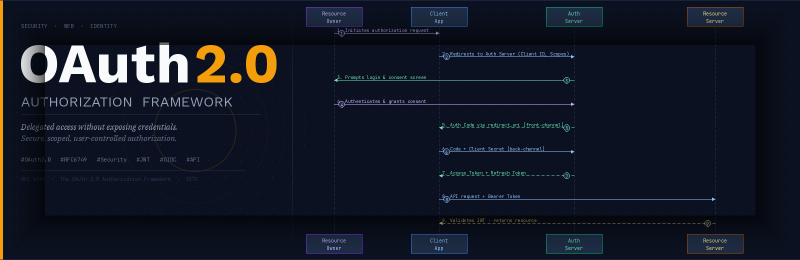
The OAuth 2.0 Communication Flow (Authorization Code Grant)
The Authorization Code Grant flow is one of the most common and secure OAuth 2.0 flows, particularly suitable for confidential clients (applications capable of securely storing a client secret). Today, this flow is typically combined with PKCE for additional protection, even for confidential clients.
  sequenceDiagram
    actor RO as Resource Owner (User)
    participant UA as User-Agent (Browser)
    participant C as Client (Application)
    participant AS as Authorization Server
    participant RS as Resource Server (API)

    RO->>C: 1. Initiates authorization request<br/>(e.g. clicks "Connect with Google")
    C->>UA: 2. Redirects to Auth Server<br/>(Client ID, Scopes, Redirect URI, response_type=code)
    UA->>AS: 2. Follows redirect to Auth Server
    AS->>UA: 3. Prompts for login and consent
    UA->>RO: 3. Displays login/consent screen
    RO->>UA: 4. Authenticates and grants consent
    UA->>AS: 4. Submits credentials and consent
    AS->>UA: 5. Redirects back with Authorization Code<br/>(via redirect_uri)
    UA->>C: 5. Delivers Authorization Code<br/>(front-channel, via browser redirect)
    C->>AS: 6. Exchanges Auth Code + code_verifier<br/>(and Client Secret if confidential client)
    AS->>C: 7. Issues Access Token (and Refresh Token)
    C->>RS: 8. Requests resource with Access Token<br/>(Authorization: Bearer <token>)
    RS->>C: 9. Validates token and returns protected resource
The flow involves the following steps:
- Client Initiates Authorization Request: The Resource Owner (user) clicks something in the Client application that requires access to a protected resource — for example, “Connect with Google.” The Client has not yet received any credentials; it simply prepares an authorization request.
- Client Redirects to Authorization Server: The Client redirects the user’s browser (User-Agent) to the Authorization Server’s authorization endpoint, passing the Client ID, requested scopes (permissions), a
redirect_uri, andresponse_type=code. - Authorization Server Prompts for Login and Consent: The Authorization Server presents the Resource Owner with a login screen (if not already authenticated) and a consent screen detailing exactly what permissions the Client is requesting.
- Resource Owner Authenticates and Grants Consent: The Resource Owner submits their credentials and approves the consent screen directly with the Authorization Server — crucially, the Client never handles the user’s credentials. The Authorization Server then generates an authorization code.
- Authorization Code Delivered via User-Agent: The Authorization Server redirects the browser back to the Client’s pre-registered
redirect_uri, with the authorization code appended as a URL parameter. This is a front-channel step — the code travels through the browser, not directly between servers. - Client Exchanges Code for Token (Back-Channel): The Client makes a direct, server-to-server request to the Authorization Server’s token endpoint, sending the authorization code, the
code_verifier(when using PKCE), and theredirect_uri. Confidential clients also include their Client Secret. This back-channel request never passes through the browser. - Authorization Server Issues Tokens: The Authorization Server validates the code and client credentials, then issues an access token and optionally a refresh token to the Client.
- Client Requests Protected Resource: The Client uses the access token to call the Resource Server’s API, typically passing it in the
Authorization: Bearer <token>header. - Resource Server Validates and Responds: The Resource Server validates the access token — in many implementations this is done locally by verifying a JWT signature, while others rely on token introspection for opaque tokens — and if valid, returns the requested protected resource.
Understanding Tokens
Tokens are the currency of OAuth 2.0. After a successful flow, your application ends up holding one or more tokens. Understanding what each one is and how to handle it safely is essential.
Access Tokens
The access token is the credential the Client uses to call protected APIs. It is short-lived by design — typically anywhere from a few minutes to a few hours — which limits the damage if a token is leaked or stolen. The Resource Server accepts this token as proof that authorization was granted for the Client to perform a specific set of actions within a specific scope.
Access tokens come in two main formats. Opaque tokens are random strings that mean nothing on their own — the Resource Server must call the Authorization Server’s introspection endpoint to learn what the token represents. JWT (JSON Web Token) access tokens are self-contained: they are a Base64-encoded JSON payload signed by the Authorization Server. The Resource Server can verify the signature locally using the Authorization Server’s public key, confirm that the token has not expired, check that it contains the required scopes, and respond — all without making a network call. This is a common approach in modern distributed systems because it removes the introspection bottleneck.
A JWT is made of three parts separated by dots: a header (algorithm and token type), a payload (claims such as subject, issuer, expiration, and scopes), and a signature. The signature is what makes the token tamper-proof: any modification to the payload would invalidate the signature.
Refresh Tokens
A refresh token is a credential that is typically longer-lived than access tokens, allowing the Client to obtain a new access token once the current one expires, without requiring the user to go through the full authorization flow again. This is what enables a web app to stay connected to an API across multiple sessions — the user grants access once, and the app silently refreshes its access token in the background.
Refresh tokens must be stored and handled with great care. Unlike access tokens — which are typically stateless and validated by signature — refresh tokens are often stateful secrets. If a refresh token is leaked, an attacker can use it to obtain fresh access tokens for as long as the refresh token remains valid. For this reason, many Authorization Servers implement refresh token rotation: each time a refresh token is used to obtain a new access token, the old refresh token is invalidated and a new one is issued. If the same refresh token is used twice (a sign that it was stolen), the server can revoke the entire token family.
Scopes
Scopes define the boundaries of what an access token allows. When the Client initiates an authorization request, it specifies a list of scopes it is requesting — for example, read:emails, write:calendar, or profile. The Resource Owner sees these scopes on the consent screen and decides whether to approve them. The issued access token will only carry the approved scopes, and the Resource Server enforces them.
Scopes are a powerful tool for applying the principle of least privilege: an application should request only the permissions it actually needs, not a broad “read everything” scope by default. Well-designed scopes let users make informed decisions about what they are granting and give the Resource Server the information it needs to enforce fine-grained access control.
Common Mistakes and Security Pitfalls
OAuth 2.0 is a flexible framework, and that flexibility creates room for implementation errors. Here are the most common mistakes developers make — and how to avoid them.
Storing tokens in localStorage
Single-page applications often store tokens in localStorage for convenience. This is a significant security risk. Any JavaScript running on the page — including third-party scripts, injected ads, or browser extensions — can read localStorage. A single XSS (cross-site scripting) vulnerability is all it takes to exfiltrate every token stored there.
One safer alternative for browser-based apps is to use HttpOnly cookies managed by a lightweight backend (the BFF — Backend for Frontend pattern), or to keep tokens in memory only (they are lost on page refresh, but can be silently re-acquired using a hidden iframe or a background refresh if the user still has an active session at the Authorization Server).
Not validating the state parameter
The state parameter is an optional-but-recommended random value the Client includes in the authorization request and expects to see returned unchanged in the redirect. It is a CSRF protection mechanism: if the state in the redirect does not match what the Client originally sent, the Client should reject the response. Omitting this check leaves the authorization flow open to cross-site request forgery attacks, where an attacker tricks the Client into completing a flow that was initiated by someone else.
Requesting overly broad scopes
It is tempting to request all available scopes up front to avoid asking the user for permission again later. This violates the principle of least privilege and erodes user trust — users shown a consent screen requesting access to “read and write all your files” when the app only needs to read one folder will reasonably decline. Request only what you need, when you need it. This is sometimes called incremental authorization or dynamic scopes.
Using the Implicit Grant in new applications
The Implicit Grant is still widely documented and is still supported by many Authorization Servers, but it should not be used in any new application. It returns the access token directly in the URL fragment, where it can be logged by servers, leaked through the Referer header, and accessed by any JavaScript on the page. Authorization Code + PKCE provides all the same benefits for public clients without these risks.
Treating OAuth as authentication without OIDC
A classic mistake is using the presence of a valid access token as proof of the user’s identity. An access token proves that someone authorized the Client — it does not tell you who that someone is. If you need user identity (to create a session, display a name, or look up an account), you must use OpenID Connect on top of OAuth 2.0 and validate the ID token, not the access token.
OAuth 2.0 and OpenID Connect: How They Fit Together
OAuth 2.0 and OpenID Connect are closely related but serve different purposes. Understanding where one ends and the other begins clears up a lot of the confusion in this space.
OAuth 2.0 answers: “Can this application do this action on behalf of this user?” It deals in access tokens and scopes. It says nothing about identity.
OpenID Connect answers: “Who is this user?” It is an identity layer built directly on top of OAuth 2.0, using the same flows and endpoints. It adds one key artifact: the ID token, a JWT issued alongside the access token that contains claims about the authenticated user — things like sub (subject identifier), email, name, picture, and iat (issued-at timestamp). It also defines a standard userinfo endpoint that the Client can call with the access token to retrieve additional claims.
When you use “Sign in with Google”, you are using OIDC built on top of OAuth 2.0. Google acts as both the Authorization Server (issuing access tokens) and the OpenID Provider (issuing ID tokens). Your application receives both. The access token lets your app call Google APIs. The ID token tells your app who just logged in.
The practical takeaway: if your use case is pure API access delegation (e.g., a service that reads a user’s calendar), OAuth 2.0 alone may be sufficient. If your use case involves user login and session management, you want OIDC.
Other Important Considerations
- Token Lifespan: Access tokens are typically short-lived for security reasons. Refresh tokens, which are long-lived, allow the Client to obtain new access tokens without requiring the Resource Owner to re-authorize the application [1].
- PKCE (Proof Key for Code Exchange): This extension to the Authorization Code Grant flow is essential for public clients (e.g., mobile apps, single-page applications) that cannot securely store a client secret. PKCE mitigates authorization code interception attacks by adding a dynamically created cryptographically random key to the authorization request. Modern security guidance recommends using PKCE for all clients, including confidential ones [1].
- Token Revocation: OAuth 2.0 defines a token revocation endpoint (RFC 7009) that allows clients and authorization servers to explicitly invalidate access and refresh tokens. This is important for logout flows and for responding to security incidents.
- Authorization Server Discovery: Most modern Authorization Servers expose a well-known discovery document at
/.well-known/openid-configuration(for OIDC) or/.well-known/oauth-authorization-server(for pure OAuth 2.0, defined in RFC 8414 [7]). This document lists all the server’s endpoints, supported grant types, signing algorithms, and scopes, allowing clients to configure themselves dynamically.
Conclusion
OAuth 2.0 is one of those technologies that initially looks complex but becomes intuitive once you understand the problem it solves and the mental model behind it. The key insight is the separation of concerns: the user authenticates with the Authorization Server, and the Authorization Server issues a limited, scoped token that the Client uses to act on the user’s behalf. The user’s credentials never leave the Authorization Server.
The main takeaways from this guide:
- OAuth 2.0 is an authorization framework, not an authentication protocol. For identity, layer OpenID Connect on top.
- The real security property it provides is delegated access without credential exposure — not identity hiding.
- The Authorization Code Grant + PKCE is the right choice for almost all new applications today.
- Tokens are sensitive credentials. Store access tokens in memory or HttpOnly cookies. Protect refresh tokens as carefully as passwords.
- Apply the principle of least privilege to scopes: request only what you need.
- The Authorization Server may delegate authentication to an external identity provider — this is the norm in enterprise deployments with Keycloak, Okta, and Auth0.
As your applications grow in complexity — microservices, third-party integrations, mobile clients, machine-to-machine calls — OAuth 2.0 provides the vocabulary and the machinery to express and enforce authorization boundaries clearly and securely.
References
[1] DigitalOcean. “An Introduction to OAuth 2.” DigitalOcean Community, https://www.digitalocean.com/community/tutorials/an-introduction-to-oauth-2.
[2] Auth0. “Authentication vs. Authorization.” Auth0 Docs, https://auth0.com/docs/get-started/identity-fundamentals/authentication-and-authorization.
[3] Auth0. “OAuth 2.0 Authorization Framework.” Auth0 Docs, https://auth0.com/docs/authenticate/protocols/oauth.
[4] IETF. “RFC 6749 — The OAuth 2.0 Authorization Framework.” https://datatracker.ietf.org/doc/html/rfc6749.
[5] IETF. “RFC 7636 — Proof Key for Code Exchange by OAuth Public Clients.” https://datatracker.ietf.org/doc/html/rfc7636.
[6] IETF. “RFC 7009 — OAuth 2.0 Token Revocation.” https://datatracker.ietf.org/doc/html/rfc7009.
[7] IETF. “RFC 8414 — OAuth 2.0 Authorization Server Metadata.” https://datatracker.ietf.org/doc/html/rfc8414.